US English (US)
ES Spanish

Contact Us

If you still have questions or prefer to get help directly from an agent, please submit a request.
We’ll get back to you as soon as possible.

Please fill out the contact form below and we will reply as soon as possible.

  • Contact Us | Login
English (US)
US English (US)
ES Spanish
  • Home
  • Technology Services
  • Applications, Systems, and Access (User Provisioning and Software)
  • Application Management
  • CyberNut

Security Awareness Training

Know more about Security Awareness!

Written by Alison Bowden

Updated at September 24th, 2026

Contact Us

If you still have questions or prefer to get help directly from an agent, please submit a request.
We’ll get back to you as soon as possible.

Please fill out the contact form below and we will reply as soon as possible.

  • Business Services
  • Communications
  • Facilities & Maintenance
  • Human Resources
  • Nutrition Services
  • Student Growth & Experience
    Student Growth Student Experience
  • Technology Services
    Technology Support and Operations Device and Asset Management Applications, Systems, and Access (User Provisioning and Software) Information Security and Policies
  • Mental Health & Wellness
    Program Documents Resources
+ More

Table of Contents

Bottom Line Up Front CyberNut Reporting Tool When do I use the CyberNut Reporting Tool? CyberNut Security Training Simulated Phishing Tests

Bottom Line Up Front

  • CyberNut is our district's cybersecurity training tool for building staff awareness regarding digital fraud and providing ongoing cyber safety training.
     
  • CyberNut also offers a reporting tool that empowers users to report suspicious or harmful emails directly to Technology Services.

CyberNut Reporting Tool

With a simple click in Gmail, the reporting tool can be used to report potentially dangerous emails directly to Technology Services with one button. This message will be deleted from your inbox and sent to the cyber security team for evaluation. 

When looking at an email, this button can be found near the top of the message or on the right side of your window. 


When do I use the CyberNut Reporting Tool?

Click the reporting tool if you believe you have received a phishing email or are concerned about the content message. Any emails you report using the reporting tool will be automatically removed from your inbox until the cyber security team can evaluate it. 

Note:  The reporting tool should only be used to report emails you believe to have malicious intent. If you are receiving spam or marketing emails, you should not use the reporting to report these. You can delete these types of emails or use Gmail's spam button. For additional information, review the article linked below:

What is Phishing vs Spam?


CyberNut Security Training

Every year, all employees in the district are required to participate in CyberNut cybersecurity training. Just like Safe Schools, it is mandatory for all staff to complete this training on an annual basis. The enrollment email will look similar to the sample below:


Simulated Phishing Tests

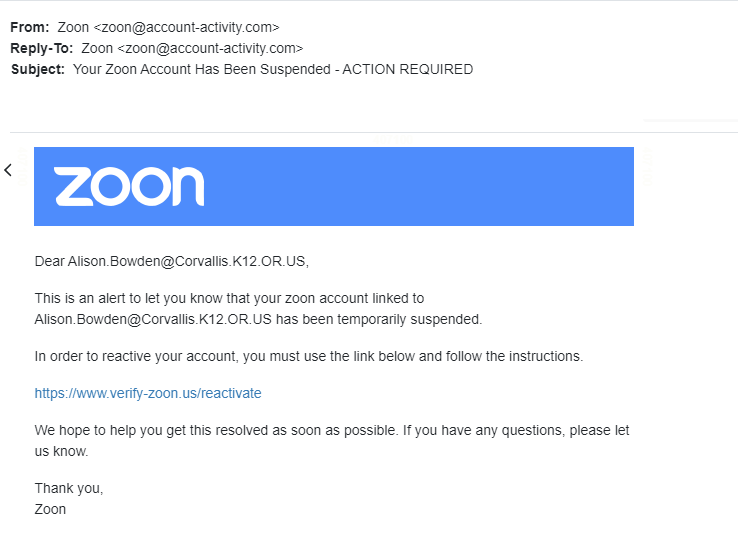
Periodically, CyberNut will send simulated phishing emails to test staff cybersecurity preparedness. These tests will help identify vulnerabilities and provide insight into staff training gaps. Always report any suspicious emails and remember to think before clicking on links!

Sample Phishing Email:
security awareness cybersecurity training

Was this article helpful?

Yes
No
Give feedback about this article

Related Articles

  • CSD Password Procedures
  • Phishing / Spam Emails
  • What To Do If You're a Victim of Phishing
Corvallis School District

Home | Login | ClassLink | Incident IQ | District Web Site

    Connect with Us

© Corvallis School District. Corvallis, Oregon


Knowledge Base Software powered by Helpjuice

Expand